
Summary
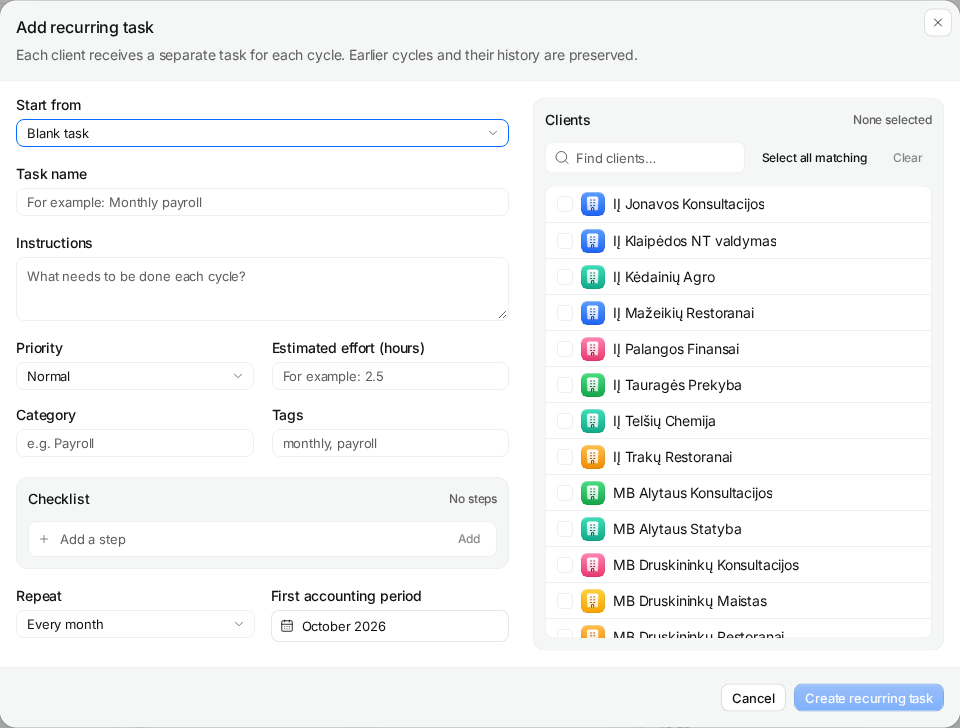
Open Recurring, add a recurring task, define its checklist and effort, choose the cadence and first accounting period, and select the clients. After creation, check the actual cycle, assignee and due date. The schedule organizes work; it does not determine a client’s legal obligations or file a return.
Before you start
Confirm the client’s scope, relevant period, internal deadline and responsible person. You need permission to manage recurring work.
Pilot scope
Use one client and a process the team already understands. Expand after the first generated task matches your expectations.
Finished when
The task appears in the intended period with the right checklist, owner and due date.
1Define the repeatable work
Choose a specific output, such as preparing the monthly VAT working papers. Separate preparation from any review that needs a different owner or deadline. The ledger calculation and official submission remain separate activities.
In Recurring, select Add recurring task. Start from a blank task or an existing task template. A template supplies reusable instructions and checklist defaults; confirm they fit this client before using them.
2Write a checklist and a realistic estimate
Enter Task name and instructions that explain what the accountant needs to deliver. Add actionable checklist steps: confirm inputs, reconcile the relevant balances, prepare working papers and record completion evidence. Use the applicable workflow guide rather than copying steps for an obligation the client does not have.
Set priority, category and tags if they help the team find work. Enter Estimated effort (hours) from your own experience. A one-hour estimate is a planning assumption, not a time entry or a promise to the client.
3Choose the cadence and first accounting period
Choose the repeat frequency and first accounting period. For a monthly process, distinguish the month being accounted for from the month in which the task is due. Review the due-day and weekend settings against your internal working deadline.
Do not start far back in time just to make the calendar look complete: an earlier first period may generate work that is already overdue. Historical migration needs its own reviewed plan. Use the Lithuania tax calendar as a source-checking aid, then confirm the actual obligation and date.
4Select clients and create the recurring task
Use the client search and check only clients covered by this process. A filtered list is a selection aid; it is not proof that every matching client has the same filing obligation. For the pilot, select one client and choose Create recurring task.
Open the generated task and set or confirm the responsible person. If review needs another owner, create an explicit review task and agree its handoff. Do not assume a separate reviewer has been assigned automatically.
5Check the first cycle and future changes
- Confirm the client, accounting period, due date and responsible person on the actual task.
- Compare its checklist and estimate with the intended process.
- Inspect the next period in Recurring before expanding the client selection.
- Complete the work through the normal task flow and keep evidence in the relevant systems.
Changes to recurring checklist and effort defaults apply to future cycles. Due-day changes can move eligible open tasks that are not yet due; manually moved tasks are preserved. Inspect affected tasks rather than expecting every existing cycle to be rewritten. Read the recurring task feature for the operating boundaries.
Questions
Can I use one recurring task for every client?
Only if the scope and scheduling rules apply to each selected client. Different obligations, deliverables or internal deadlines need separate configurations.
Does changing a template rewrite old tasks?
Do not expect historical tasks to be rewritten. Check future-cycle defaults and inspect any open work affected by a scheduling change.
Will Claister file the return?
No. Claister organizes work and evidence. Calculations and filing remain in your ledger and the official portals.
Screens use the current English app UI. Claister’s app is available in English and Russian; these guides are available in English and Lithuanian.
Editorial policy →Start in Claister
Set up the applicable process in your own workspace and verify it with a small client group.