The workspacefor accounting firms
Clients, recurring work, deadlines, documents and messages in one place. Your ledgers stay where they are.
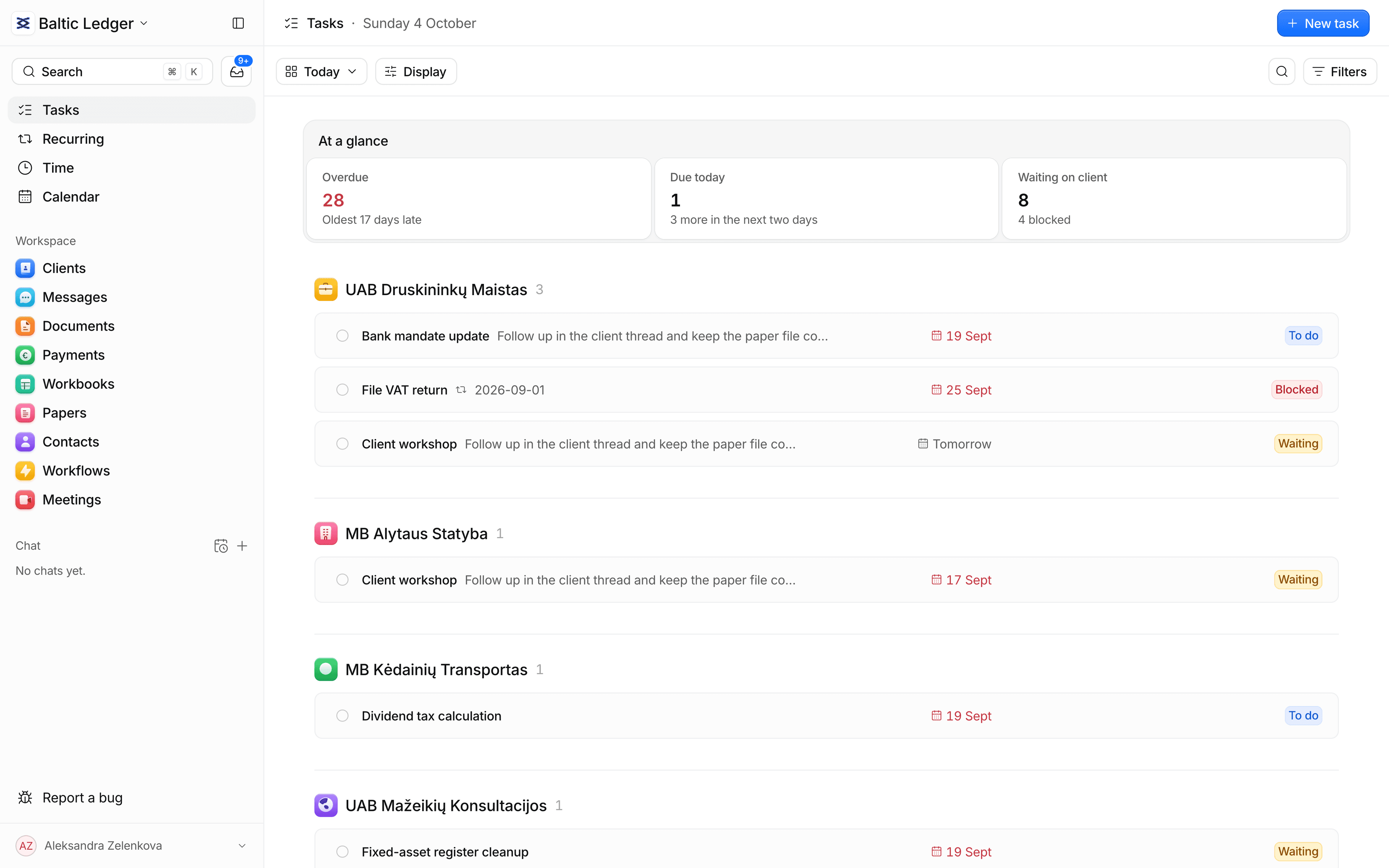
One workspace for the work around the ledger
Everything your team does around the ledger, connected in one place.
- Plan the workSet up a series once. Every client gets every period, with deadlines, tasks and an owner, by itself.
- Collect from clientsAsk once. Clients open a link, upload and confirm; you review and accept. Files stay on the client.
- Run the officeOne queue of what is overdue and what waits on clients, assigned by role, with history on every client.

 IĮ Jonavos Konsultacijos
 To doOct 2026 · Due 12 Oct

 IĮ Klaipėdos NT valdymas
 IĮ Kėdainių AgroTo doOct 2026 · Due 12 OctIĮ Baltijos LogistikaTo doOct 2026 · Due 12 Oct
The chores that eat a firm's week
Each one solved in the app, not around it.
Set up month-end once, not 80 times
A series for payroll, VAT or annual reports creates every period for every client, with weekend rules and a preview of the next three.
No more “did they send it?”
See which documents are missing, received or accepted on every request, and ask for a fix in one step.
Know what's late before the client calls
Overdue, due today and waiting on a client, counted for you and one click from the work itself.
Know who has paid the authorities
Follow each client's tax payment from awaiting, to reported paid with a receipt, to verified by you.
Ask your workspace, don't dig
Ask who owes documents or what is overdue. Answers cite their sources, and reminders are drafted for you to confirm.
Leave Excel in an afternoon
Map the columns, preview the result, see the errors, then confirm. Duplicates are caught and nothing is lost.
Up and running in an afternoon
From an empty workspace to work that runs by itself, in four steps.
- 01
Create
Open a workspace, invite the team, set roles.
- 02
Import
Bring clients in from a CSV or add them by hand.
- 03
Schedule
Describe each service once. Periods appear by themselves.
- 04
Confirm
The assistant drafts. You decide what goes out.
Within three weeks of using Claister, my anxiety dropped to zero. No more nightmares about forgotten documents. I used to have them all the time.
 Natalija MiadzelicAccountant in Lithuania · 30+ years in practice
Pricing that grows with your firm
Every plan starts with 14 days free, no card needed.
Solo
For one accountant working alone
€19per monthBilled monthly
Start 14-day trial- One user
- Clients, contacts, CSV import
- Recurring work and deadlines
- Document requests and client portal
- Email and Telegram follow-ups
- Payments, time, workbooks and papers
- AI assistant that drafts, you confirm
- Two-factor sign-in
- Most popular
Team
For firms with a team
€24per person, per monthBilled monthly
Start 14-day trial- Everything in Solo
- Roles and client assignment
- Permissions and activity history
- Priority support
Enterprise
For larger firms
Customtailored to your firm
Start 14-day trial- Everything in Team
- Help moving your clients over
- A direct line to the team
- Terms that fit your firm
Where Claister goes further
Every practice tool covers the basics. Claister adds AI throughout, Telegram and email built in, and the tools your clients already use.
 Claister
Your clients' data stays theirs
Built so one firm never sees another's data, and nothing leaves without a person.
Real permissions
Roles decide who sees clients, files and money. Accountants see only the clients assigned to them.
Isolated firms
Separation is enforced in the database itself, not just in the app.
You confirm
The AI suggests. Nothing is sent without a person.
Ledgers untouched
Claister never files or posts in your accounting system.
Files stay private
Files are scanned and never get a public link. Every download checks access.
Every change on record
Who changed what and when is kept, and can't be edited afterwards.
Questions, answered
The things firms ask before they start.
Sign up and try Claister with your own clients for 14 days, free and with no card. There is no plan to pick: it follows your team, Solo for one person and Team priced per person. Nothing is imported or sent unless you do it.
No. Your ledgers stay where they are. Claister never files or posts in your accounting system; it keeps the work around the ledger in one place.
Yes. Each client gets a portal where they upload files, answer requests and confirm. They only see what is shared with them.
No. It drafts reminders, replies and summaries. A person confirms before anything is sent, attached or changed.
In the EU. Each firm's data is separated in the database itself, and files stay private: no public links, and every download checks access.
Import them from a CSV or add them by hand, then describe each service once. Periods and deadlines appear by themselves. Invite your team and set their roles.
Lithuanian deadlines and practical guides
The filing calendar by month, and guides for the work every firm repeats.
Full calendarLate client documents: a cut-off workflow
Handle client documents arriving after cut-off with a receipt record, impact review, clear client wording and a controlled correction or carry-forward process.
3 min readDocument request list template for accounting clients
Three document lists you can copy for accounting clients: monthly bookkeeping, VAT and year-end, plus how to adapt them.
3 min readMonth-end close checklist for accounting firms
A month-end close checklist for client accounting: completeness, reconciliations, review, unresolved items and a clear handoff to reporting and filing.
3 min readClient onboarding checklist for accounting firms
A step-by-step onboarding checklist for new accounting clients: what to collect, what to agree, and how to set up recurring work in the first 30 days.
4 min readi.SAF checklist: review the invoice register
An i.SAF invoice-register review checklist: duplicates, period selection, VAT classification, reconciliation and the evidence to keep after submission.
3 min readLithuania tax calendar 2027: a firm's working plan
Build a Lithuania tax calendar for 2027 with separate filing, payment and client cut-off dates, official sources and a monthly control checklist.
4 min readBring the work around your ledgers into one place
Create a workspace for your firm and be up and running in an afternoon.