
Summary
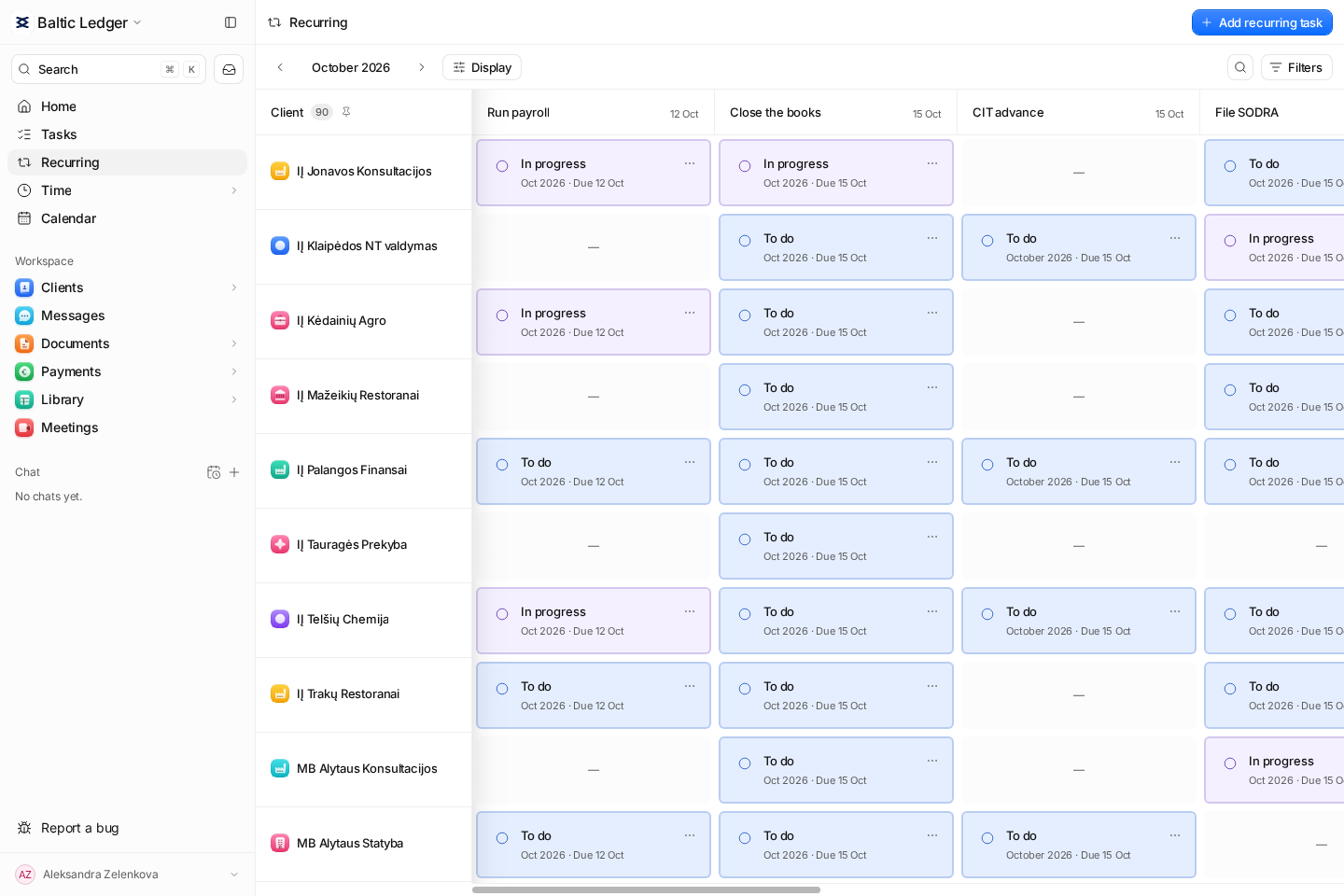
Claister turns a recurring definition into separate client tasks for each scheduled period. The Recurring matrix shows who still needs work, while earlier cycles remain available instead of being overwritten by the next month.
One cycle per period
Keep September and October work separate, including unresolved earlier cycles.
One view across clients
Use the recurring matrix to see assigned work and gaps across the client list.
A history you can inspect
Open the task and its cycles to understand what happened before the current period.
A new month should not erase the previous one
A spreadsheet often reuses the same row every month. That hides whether a missing bank statement belongs to last month or the current period. In Claister, a schedule generates a separate task for each cycle, linked to its client and accounting period. Open earlier work stays visible; completing the current cycle does not resolve it.
Use monthly, quarterly or yearly recurrence for the obligations that actually apply to the client. Choose the due day, first period and weekend adjustment, then inspect the preview before saving. The schedule organizes work around a date you select; confirm statutory dates from the relevant authority.
Keep preparation and review owned
Assign the people responsible for the work. A task template can provide checklist items, priority and an effort estimate. If another person needs to review the result, create and assign a separate review task so that preparation and approval are both visible.
- Open a client's Recurring tab when reviewing that client's periods.
- Use Tasks for the employee's concrete queue and supporting documents.
- Use skip with a reason when a cycle does not apply, rather than treating it as completed work.
Change future work without rewriting its history
Workflow versions preserve the definition used to generate work. Changes to checklist or effort defaults apply to new cycles; generated tasks retain their own records. A due-day change can also move open cycles that are not yet due and whose date was not moved by hand. Check the affected work after changing a schedule.
Start with one defined process and two representative clients. Run preparation, document collection, review and completion for a full period before extending the setup across your firm. See the step-by-step recurring setup guide.
Questions
Can one recurring definition be assigned to several clients?
Yes. Select the relevant clients when creating or assigning recurring work. Each client receives separate cycle tasks and history.
Does it automatically choose Lithuanian tax deadlines?
You set the applicable schedule. Use the Lithuania calendar and official sources to confirm the client's obligations and dates.
What happens to an unfinished older cycle?
It remains part of the client's work and cycle history. Starting the next period does not mark an earlier task complete.
Screens use the current English app UI. Claister’s app is available in English and Russian; these guides are available in English and Lithuanian.
Editorial policy →Start in Claister
Set up the applicable process in your own workspace and verify it with a small client group.