
Summary
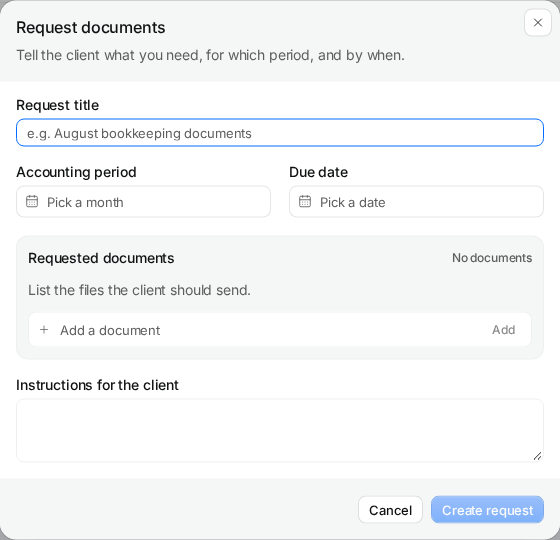
A Claister document request records the client, accounting period, due date and required items. Client returns stay separate from accountant acceptance, so a received file does not silently become completed work.
Ask for exact items
Name the bank statement, invoice set or other document needed for the period.
Review the return
Keep received files separate from accepted evidence and request corrections when needed.
Own the follow-up
Choose and review the message and channel before sending a reminder.
Turn a vague chase into a defined request
‘Please send everything’ leaves the client guessing and the accountant reconstructing the list. Create a request for one client and period. Add individual items, a due date and instructions about completeness: for example, the full bank statement for September rather than a screenshot of the closing balance.
Saving the request makes it available in the client portal. Notification is a separate action. Review the recipient and draft before sending through a configured channel. Your team keeps the request as the work record rather than treating an email reply as the whole process.
Received is a review state, not proof of completion
Portal uploads can be linked to specific request items. The return moves into review; an accountant still needs to check period, coverage, legibility and relevance. Accept the documents when they satisfy the request or ask for corrections with a clear explanation of what is missing.
- Check that a statement covers the complete period.
- Resolve duplicate or incomplete invoice batches before accepting them.
- Keep the missing item visible when only part of the request has returned.
Follow up with current facts
The request interface can offer an editable follow-up after three days without a newer send or document return. A person chooses the channel, reviews the text and sends it. This is a suggested follow-up, not an unattended email sequence.
Start with one monthly request and a saved client contact. Test the client's return and your acceptance, then expand to more clients. Follow the document collection how-to for the form and review sequence.
Questions
Does saving a request send an email?
The request is saved to the portal first. Sending a notification or follow-up is an explicit action after reviewing the draft and recipient.
Can a partial return stay open?
Yes. Returned documents and outstanding items remain distinguishable, and the accountant controls acceptance.
Do I need to move my ledger into Claister?
No. Keep the financial records in your accounting system; use Claister to coordinate requests, evidence and the surrounding client work.
Screens use the current English app UI. Claister’s app is available in English and Russian; these guides are available in English and Lithuanian.
Editorial policy →Start in Claister
Set up the applicable process in your own workspace and verify it with a small client group.