
Summary
Consider Claister for a pilot centred on client-linked recurring tasks, document requests and saved-time reporting. Consider Karbon when integrated email triage, collaboration and the chosen plan's automations are central to how your team works. Claister publishes this source-based comparison; it is not an independent product test.
A client-period focus
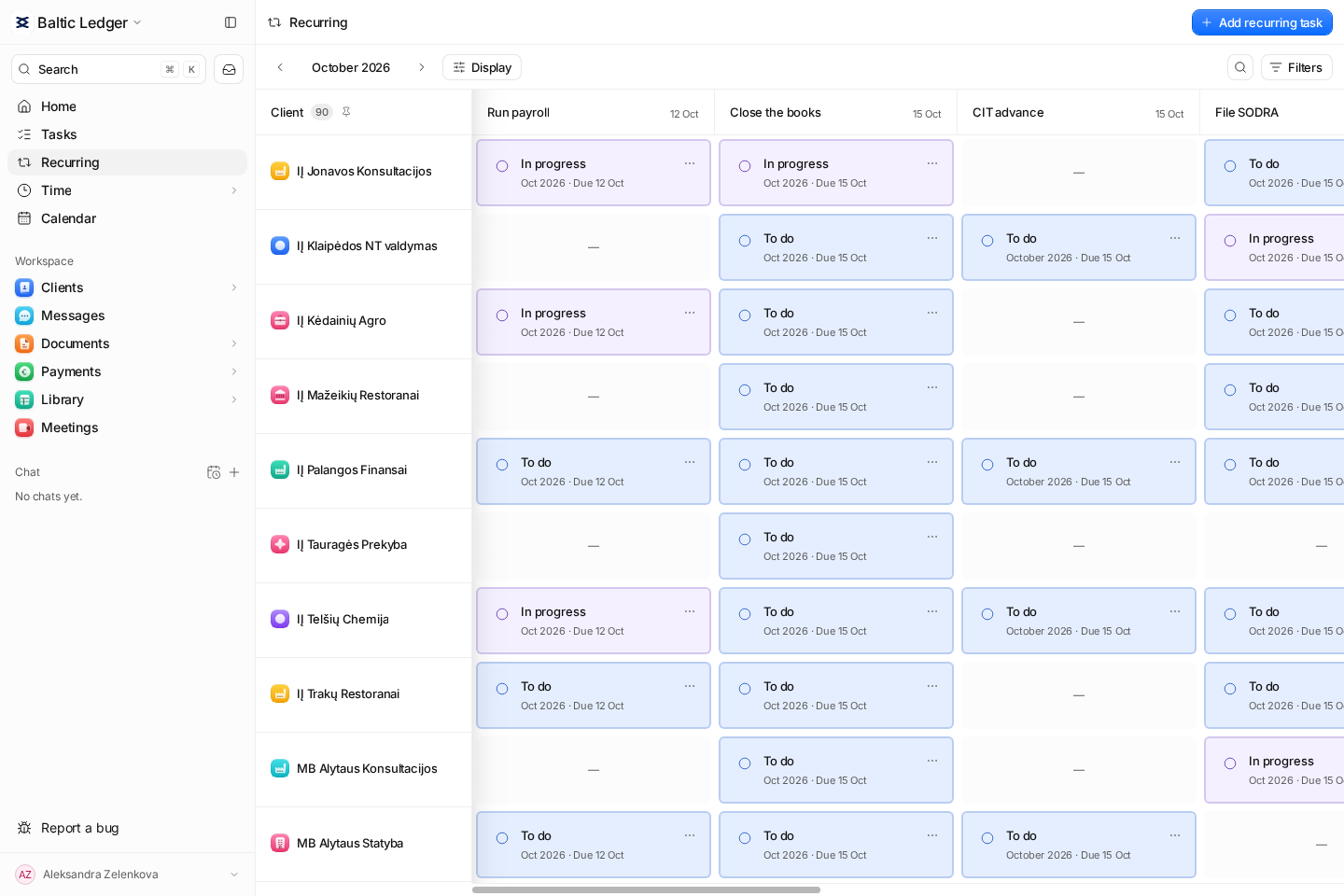
Test Claister's matrix, concrete cycle tasks and the evidence behind a period.
An email-led workflow
Test Karbon's published email triage and conversation-to-work collaboration.
Plan-specific automation
Confirm the exact plan for reminders and task automation before comparing cost.
Compare how work enters and leaves the team
Karbon's official plans list integrated email, workflow and to-do lists, team collaboration, time and budget reporting, and a client portal. Business adds automatic client reminders, task automation and industry integrations to Team. Compare the chosen plan against your real handoff.
Recurring periods
- Claister
- Client/period tasks and a matrix showing assigned work; old cycles remain accessible.
- Karbon
- Published work templates, scheduler and workflow tools. Demonstrate how unfinished prior-period work remains visible.
Email collaboration
- Claister
- User-connected email and client-linked messages; reviewed drafts and explicit sends. Do not assume a Karbon-style shared triage workflow.
- Karbon
- Published email triage with sharing, assignment and comments in the context of work.
Time and planning
- Claister
- Saved actual entries by client, task and person; Planning uses estimates and assignee capacity.
- Karbon
- Published time tracking, work budgets and capacity planning. Confirm the views and limits in your plan.
Client requests
- Claister
- Itemized period requests with accountant acceptance and company-scoped portal access.
- Karbon
- Published client requests, uploads and portal; demonstrate partial return, correction and completion.
Automation
- Claister
- Recurring generation plus editable suggested follow-ups; a human controls sending.
- Karbon
- Business lists automatic client reminders and task automation. Test triggers and exceptions rather than assuming every plan includes them.
Rollout
- Claister
- Pilot one process and a small client group. Current app UI: English and Russian.
- Karbon
- Evaluate email connection, template setup, staff adoption and your required client languages before moving the team.
Match the plan to the automation you need
Karbon publishes Team, Business and Enterprise plans, annual and monthly billing options, and a currency selector. Its page states monthly subscriptions are available for teams of four or more. If automatic reminders or industry integrations are essential, compare the plan that includes them rather than the lowest displayed tier. Karbon pricing.
Claister publishes Solo at €19/month or €190/year, and Team at €24/person/month or €240/person/year. These are the site's published plans; confirm pilot access and commercial terms with Claister. Compare the competitor's quote in the same currency and tax basis, adding onboarding, migration and any services you would keep. Claister pricing.
Measure one full work cycle: email triage, task setup, client response, review and reporting. Include the team's connection and training effort. A tool that removes an important shared-inbox routine needs a replacement workflow, even if its recurring tasks look familiar.
Try an email-heavy client and a recurring client
- Pick one client whose work arrives mainly through email and another with a stable monthly process.
- Turn a new client question into an owned task and keep its context available to a colleague.
- Request a missing document, review a partial return and complete the period.
- Record actual time and compare it with the original estimate.
- Review who can see the client, email and time records; export a sample before committing to a move.
Keep Karbon when email collaboration is already well adopted and the required automation is available in your plan. Pilot Claister when its client-period model fits the work and your team can demonstrate the communication handoffs it needs. The Karbon alternatives guide covers a broader shortlist.
Questions
Are Karbon features identical across its plans?
No. The official page lists plan differences, including Business additions for automatic reminders, task automation and industry integrations. Check the chosen plan.
Is Claister an equivalent shared inbox?
This comparison does not claim Karbon-style email triage parity. Demonstrate your firm's assignment, collaboration and message-history requirements in the Claister pilot.
Which is cheaper for my firm?
Use current quotes for the same currency, staff count, billing period and required features. Add connection, migration and training effort rather than comparing unlike starting tiers.
Official sources
Screens use the current English app UI. Claister’s app is available in English and Russian; these guides are available in English and Lithuanian.
Editorial policy →Start in Claister
Set up the applicable process in your own workspace and verify it with a small client group.