
Summary
Claister supports manual time entries and a timer you stop, review and save. Client and team reports use saved actual time, while Planning uses task estimates. A running timer is not a completed time entry.
Time in client context
Link an entry to a client and, when appropriate, the task you worked on.
Review before saving
Check duration and notes after stopping the timer; correct entries with history.
Actual and planned effort
Use saved entries for actual time and task estimates for future capacity.
Capture effort without making time mandatory
Tasks can be completed without a time entry. When effort is useful for understanding scope or pricing, add it manually or start a timer for the relevant client and task. Each employee has one pending timer across workspaces, helping avoid parallel timers for the same work.
Stop the timer when work pauses. Review the duration, date, client, task and note before saving. The reporting totals include saved entries, not a timer that has merely been stopped. Correct an entry when its allocation is wrong rather than building a second spreadsheet total.
Review one client's month before drawing conclusions
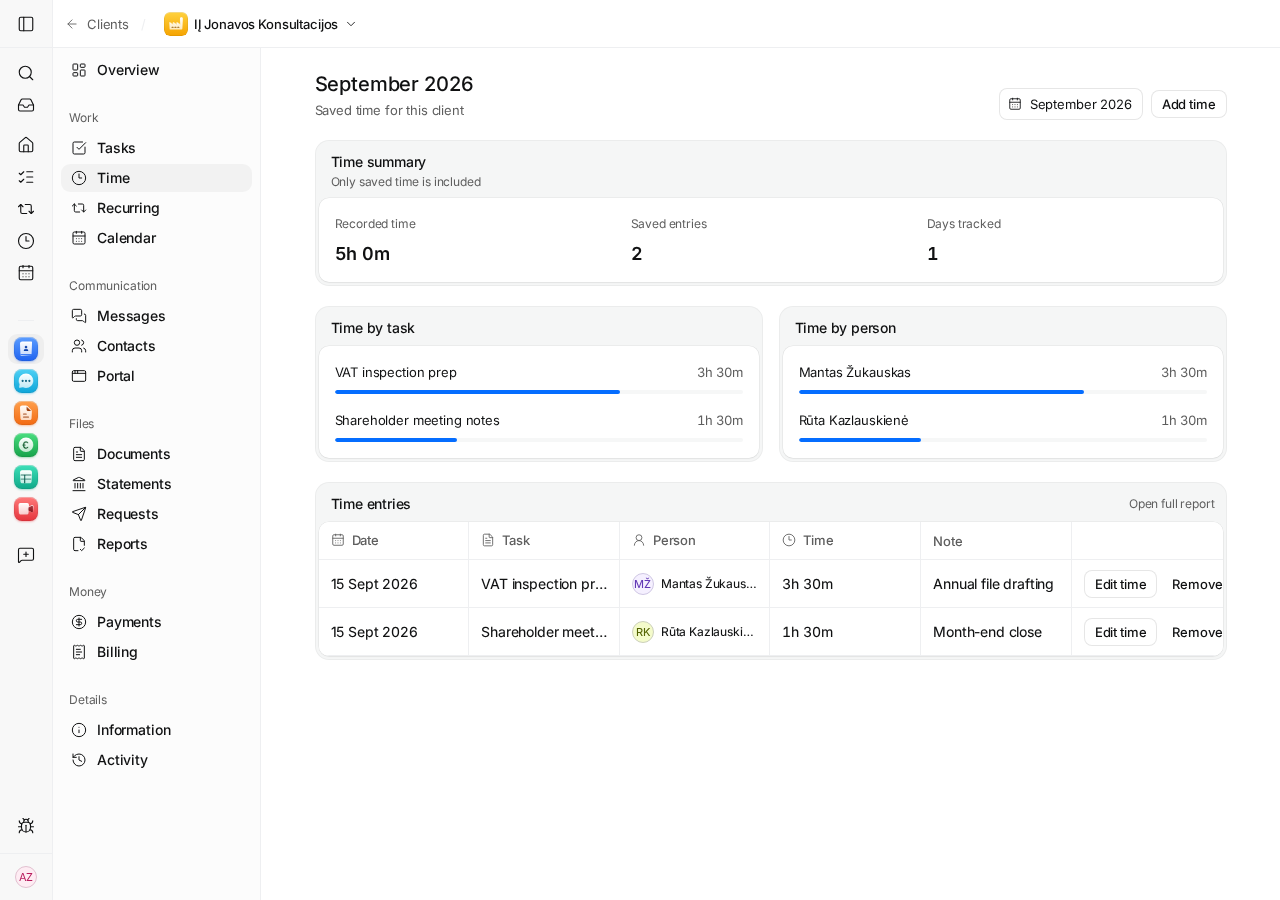
Open the client's Time tab and select the month. The summary shows recorded time, saved entries and tracked days, followed by breakdowns by task and person. Use the entry list to inspect why the work took longer: missing documents, extra advice or a one-off correction can change the picture.
Compare like-for-like service periods. Hours alone are not profitability: you also need the fee, staff cost, overhead and unrecorded effort. Use the fixed-fee calculator to test a pricing assumption, then compare it with actual saved time.
Use estimates to plan, actual time to learn
Planning reads task estimates and the primary assignee. It allocates work to the due week, or across working days when start and due dates are both present. It is a view of estimated effort, not an hour-by-hour rota. Saved-time reports remain the record of actual effort.
- Set an estimate for a defined task scope.
- Check the team view with the appropriate permissions.
- Review actual entries after the period and adjust future estimates where the scope changed.
Follow the client time how-to to try the manual-entry, timer and reporting sequence.
Questions
Must every task have a timer?
No. Time tracking is optional. Add manual time or use a timer when the effort record is useful.
Can a colleague see all staff time?
Visibility depends on permissions and client access. Without time-management permission, a person is restricted to their permitted own records.
Does the report calculate net profit?
Saved time measures effort. Assessing profit also needs the client's fee, staff cost, overhead and scope; a time total alone does not establish profit.
Screens use the current English app UI. Claister’s app is available in English and Russian; these guides are available in English and Lithuanian.
Editorial policy →Start in Claister
Set up the applicable process in your own workspace and verify it with a small client group.